
Running out of battery just by the middle of the day is something that irks us all. As the phones got smarter, their battery drain accelerated. With fast processors, slimmer built, increasing number of software, and evolving internet connections, the phone battery tends to dwindle.
Turning off our phones may seem like a plausible option at times like these. However, there are various other ways by which you can conserve your phone battery.
#1. Social media refresh
The social media applications, with their polling and refreshing, can consume a lot of battery. Change the setting of your social media applications to manual mode to keep them from refreshing automatically.

(Image Courtesy; Daily Vibe)
#2. Apps running in the background
We often shun the multiple applications running in the background while focusing only on the apps which have a recurrent use. The background apps end up eating a significant amount of battery. You can either go to settings>applications and do away with the apps that you do not require. Alternatively, you can take help of other applications, which would manage the background apps for you.

(Image Courtesy: Code Rewind)
#3. Brightness
Your screen’s brightness can surprisingly drain the battery of your phone. Keep the intensity low will help you conserve your battery efficiently. If you maintain the habit of keeping the brightness low permanently, your eyes will not have to go through the stress of adjusting to different levels of intensity every time they are exposed to the screen.
(Image Courtesy: iPhone Life)
#4. App updates
Application updates not only provide you with the new features of a particular application but they also help in conserving your phone’s battery. Updated applications tend to consume less amount of battery as compared to the pending-for-update applications.

(Image Courtesy: MapMyFitness)
#5. Vibration mode
Albeit vibration mode is a convenient way to keep your phone hushed and get notified of calls and texts at the same time, it ends up gulping down a large chunk of the battery. Avoid putting your phone on vibration mode when it is not a matter of social obligation.

(Image Courtesy; Iconscout)
#6. Timeout
Keeping the screen of your phone on for a long time can quickly drain the battery of your phone. Keeping your screen timeout short automatically turns off your screen after a few moments of inactivity.

(Image Courtesy: Android Central)
#7. GPS
Applications which use GPS to track your location also bring your phone’s battery down. It is wise to close these apps when they are not in use as they might continue with sending and receiving signals while running in the background.

(Image Courtesy; Epinium)
#8. Right temperature
Exposing your phone to a hot temperature may lower its battery. For a decent battery life, it is imperative that you do not keep your phone in direct sunlight or any place that has a higher temperature.

(Image Courtesy: Amazon.com)
#9. Low coverage area
Anything that requires working with signals can bring your battery to the minimum. Avoid using your phone in the area which has bad network reception, as even in such areas your phone keeps looking for signals. It is best to put your phone on airplane mode in low-coverage areas.
/about/GettyImages-599394156-58956d083df78caebc6850aa.jpg)
(Image Courtesy: Lifewire)
#10. Wifi and Bluetooth
We often make the mistake of leaving our wi-fi or Bluetooth on even when they are not in use. It makes your phone continuously look out for networks to connect with and it eventually leads to a low battery. It is highly recommended to keep your wi-fi and Bluetooth off when not in use.
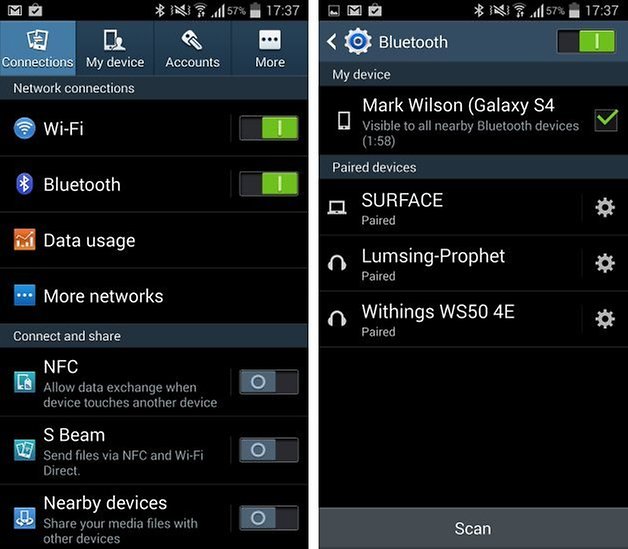
(Image courtesy: AndroidPIT)
#11. Widgets and wallpapers
They may seem harmless on the surface level, but widgets and live wallpapers have the tendency to eat up the battery of your phone. You can do away with the widgets and wallpapers you do not use to get a better battery life.

(Image Courtesy: Android Authority)
We would love to hear from you. Share your battery saving tricks with us. Kindly use the comment box to share your thoughts and opinions with us.
(Featured Image Courtesy: Mashable)

18 Opinions

10 Opinions

 Share
Share


It totally depends on the usage of a person.