

Conversations can be tricky, especially, when it is in its virtual form. When you talk to someone in person, you can always make the other person respond to you.
People’s response in a conversation is crucial. It is significant because you know that they have heard what you said, and will reply likewise. However, when the medium of conversation is virtual, how do you know that the other person has read what you wanted to convey?
Whatsapp came with its infamous blue ticks for that. Facebook's Messenger comes with a little 'read' notification beneath the message. However, when it comes to more formal communications, for which you have to converse through emails, there doesn’t seem to be a way to know if the other person has read your email or not. Is that the case? Let’s find out.
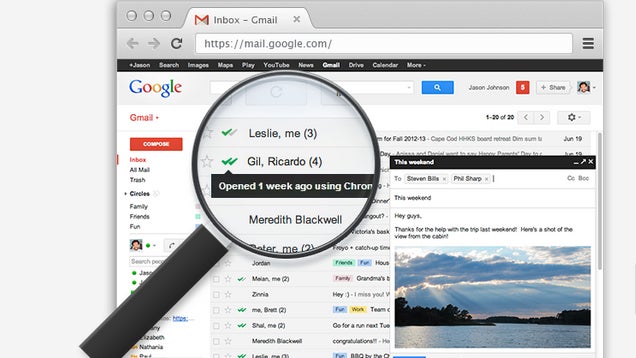
To answer this in short, NO! Technology hasn’t quite reached the stage where it is possible for you to know if your email has been read or not. However, before you think that there is no point continuing further, consider this: there are some ways in which you can know if your email has been delivered and read. Needless to say, these are not water-tight methods, and will never tell you the exact answer. But, as they say, having some knowledge is way better than having none at all. It is important to know if your email has been read, especially in circumstances when you absolutely need to convey a message a quickly. For instance, if it is a legal case, then you want to know that the other person has read what you wanted to know. You can do that by three ways. Let’s look at them one by one.
(Image Courtesy: Life Hacker)
#1. Read Receipt
If you use outlook for your email purposes, then this method is for you. Outlook users can opt for a read receipt which asks the recipient to confirm if they have read the email. To do that, you have to:
#. Create New Email
#. Click Options
#. Select Request a read receipt for this message
#. Send Email
(Image Courtesy: Chrome)
However, there is a catch in this process. Once your email is delivered, the recipient has the option to confirm if they have read the email or not. If they select No, then there is no way that you’ll know if your email has been read. Further, many people simply choose to ignore the read receipt protocol.
#2. Delivery Receipt
In Outlook, you can opt to get a delivery receipt for all your sent emails. This way, you’ll get to know if your email has been delivered to a person or not. However, in no way you can know if they have read the email. So, yet again, this too is not a water-tight option.
#3. Using Images In Email
This is perhaps the most reliable way of knowing if your email has been read. This method uses an email embedded in an HTML script which also includes one or more images. It becomes easy to track the status of email by virtue of the image. Whenever the recipient opens the email and sees the image, you can get to know the exact date and time of that. However, this method is generally used by spam mailers and as a result, almost all the people choose to not see images in their email.
(Image Courtesy: Tech Donut)
So, there you have it. There are a few ways to know if your email was read, but none of them seem to be substantial enough. If you found this article informative, let us know in the comments below.
(Featured Image Courtesy: The Register)

3 Opinions


 Share
Share


