

Forgotten or lost passwords can be quite troublesome, especially when you are in dire need of some data from your email account. Well, thankfully, there are numerous ways to reset or even recover your forgotten password which will give you an access to all your important emails again.
Here is a detailed Hotmail password reset procedure along with some ways to find Hotmail password when you lost it.
How To Reset Hotmail Password?
#1. Open The Outlook Page
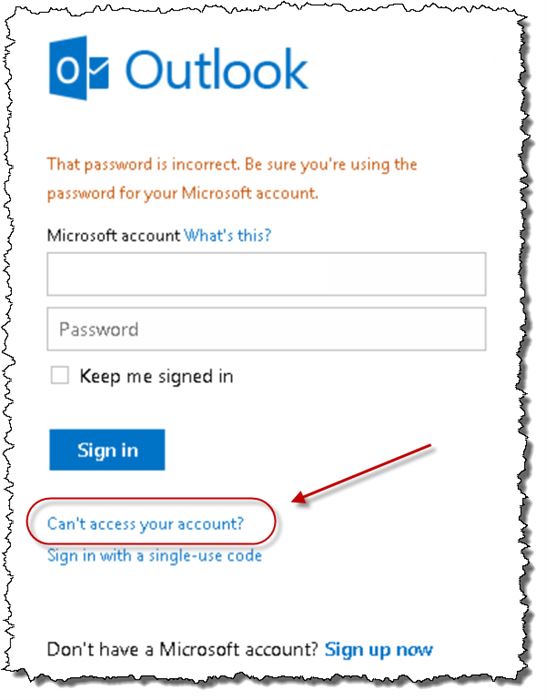
Since Hotmail has changed its name to Outlook, you can simply go to your Hotmail login page by going to outlook.com. Now, all you need to do is to enter your ID and hit enter to direct yourself to next step where you will be required to enter your password.
(Image Courtesy: Ask Leo)
#2. Forgot Password
Find here an option which says ‘can’t access your account?’ On clicking this, you will find some more options. Among these, select forgot my password and click next.
#3. Hotmail ID And Captcha
Now, you will be directed to a page where you will be required to enter your Hotmail address. Enter your Hotmail ID and the captcha followed by it, in order to get to the verification page.
#4. Verification Methods
On this page, you will be presented with various modes of verification. These include verification by email, verification by text, verification by Microsoft account application, and the questionnaire. The questionnaire is generally provided for a situation where you cannot avail any other mode.
#5. Verification Code
After you have selected your mode of verification and entered your details, you will be sent a unique verification code either on your phone, email, or application, depending on the options that you chose.

(Image Courtesy: Ask Leo)
#6. Create New Password
Once you have received the code, enter it on the page and click next. You will be allowed to create a new password for your Hotmail account. You can easily log in to your Hotmail using your new password now.

(Image Courtesy: Microsoft Blog)
Hotmail Password Recovery Using Winsuit
In case you are unable to reset your password using the regular method, you can also recover your old password by using Winsuit 2012. Here is how you can do it:-
#1. Run Winsuit 2012 And Open Password Finder
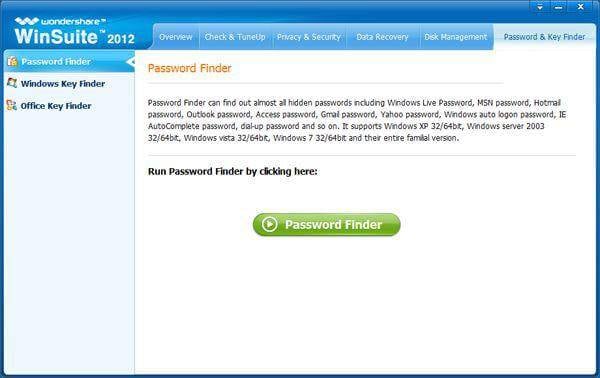
The first thing that you will be required to do is to install Winsuit 2012 and run it. After opening Winsuit, you will find the option of password finder on the left side.
(Image Courtesy: Data Recovery)
#2. Choose Password Type
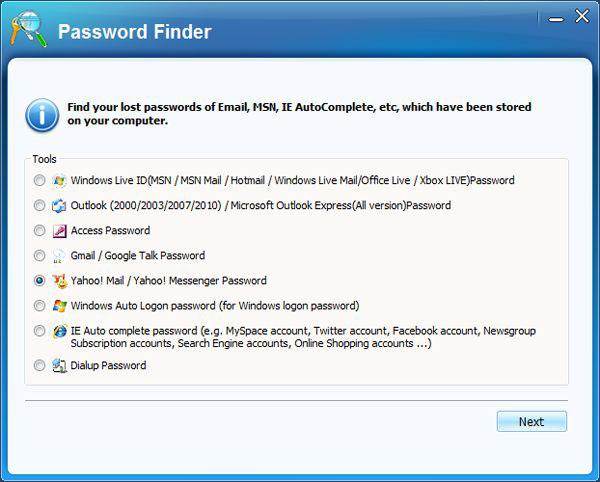
Under the password finder, you will be presented with the options of password type. Choose Windows Live to recover your Hotmail password.
#3. Take Down The Password
After you have picked your password type, you will be presented with the Hotmail password which you lost. Note down the password and log into your Hotmail account easily.
(Image Courtesy: Data Recovery)
We would love to hear from you. Feel free to drop in more information on resetting and recovering Hotmail password. Kindly use the comment box to share your thoughts and opinions with us.
(Featured Image Courtesy: Linkedin)

3 Opinions


