

A recent study shows that people around the world check their mobile phones around 500 times a day. In a broader sense, this figure means that people spend more time on their phones than sleeping.
In all honesty, this is a worrying statistic. Of all the time we are glued to our phones, most of it is spent on social media. The most popular social media sites that people spend a majority of their time are Facebook and Instagram.

(Image Courtesy: Pure VPN)
If you think Instagram is sucking up all your time and is isolating you from the real world, then it is about time that you bid goodbye to your Instagram app and account. In this article, we’ll see how you can permanently delete your Instagram account, for good. Take a look:
How To Delete Your Instagram Account?
So, now that you’ve thought the unthinkable and have finally decided to part ways with one of the most fascinating social media platforms, we would like to take this opportunity and commend you for your decision. However, we would also like to inform you that once you choose to delete your Instagram account, you will lose all your pictures, videos, followers and likes permanently. So, it is a good idea to save a copy of your pictures and videos. Once you’ve done that, follow the steps below to delete your account permanently.
#1. Before you begin, know that you can’t delete your account using the Instagram app on your phone, irrespective of the fact that you have an Android phone or an iPhone. So, go to your phone’s browser and visit Instagram.com. Log in to your account.
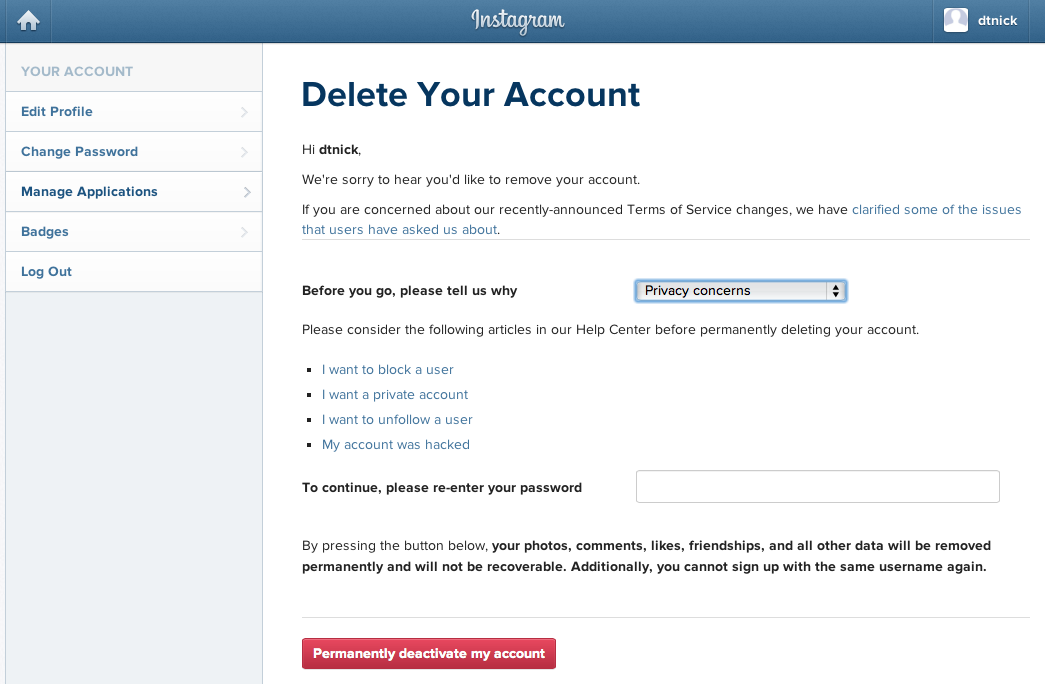
#2. Once you log in, go to the ‘Deletion Page.’
(Image Courtesy: PC World)
#3. From there, scroll down to the end of your page and select ‘Delete Your Account.’
#4. After you select it, Instagram will make a last ditch effort to persuade you into staying by asking you your reason for leaving.
#5. Once you select the appropriate option, you will be prompted to re-enter your password, following which you have to confirm the permanent deletion of your account.
We understand that the first few days without Instagram will feel dreadful. But, trust us, you will eventually be surprised by the amount of free time you have in your hands once you no longer have any access to your Instagram Account. You can invest that time into something more meaningful and make every minute count.
Have you ever deleted your Instagram account? Did you regret doing that later or did it not affect you at all? Let us know in the comments below.
(Featured Image Courtesy: Instakipical)

19 Opinions

14 Opinions

65 Opinions

5 Opinions


