

Do you know what Facetime call means? If you are an ardent iPhone worshipper, then you must be aware of Facetime call. In case, you don't know, let's understand what it is and how exactly is it used. How much data usage it requires to initiate a call smoothly?
In present times, Facetime has emerged as a strong tool of communication. So, therefore it is necessary to know about the data usage required for Facetime. Also, I’m sure you all know that Facetime can be only used if you have one of the products owned by Apple company such a MAC(laptop), iPad, Phone etc.
(Image Courtesy: 9to5 Mac)
So, Facetime is an application installed in Apple products to make video or audio calls to other users of Apple products. You cannot make a call to a non-apple product user.
Let’s begin!
Unlimited cellular data plans are passé now, so we need to keep a watch on our data usage to prevent it from running out quickly. Apple gives us various ways to check how much data FaceTime consumes over cellular network especially when it comes to their application Facetime.
One pivotal thing should be kept in mind that to view a person’s call usage for their application Facetime, Apple does not presently tell us whether the call was placed over WIFI or cellular. Having said that, keeping a check of the data for Facetime audio or video calls is a sound method to understand how much data they use.

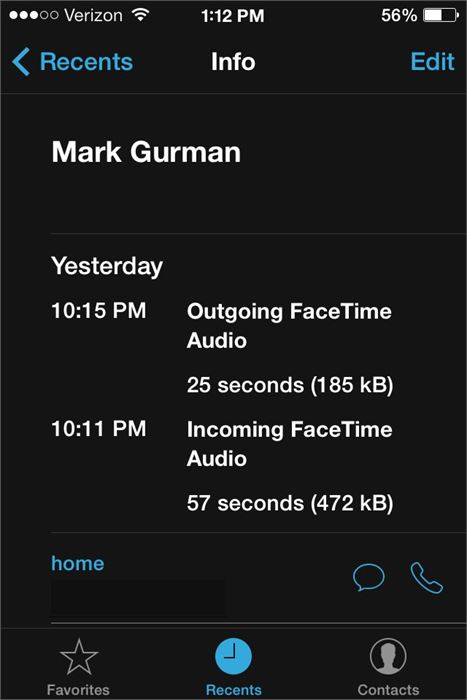
(Image Courtesy: Apple Insider)
#1. Launch the Facetime application on your iPhone/ Ipad (with cellular imbibed).
#2. Then, next step involves tapping on RECENTS in the bottom navigation
#3. The third step involves tapping on INFO button to the of the Facetime audio or video call to see the data used for that specific call
#4. Voila! The data used will be shown under every Facetime call at the top.
#1. Open the Facetime app on your iPhone or iPad.
#2. Then, the second step asks to tap on the Audio/Video at the top to figure out the call.
#3. Thirdly, tap on the INFO button for the call you wish to see the cellular usage for.
#4. Then, you get the result! Data will be shown under the Facetime call at the top.
#1. Open the SETTINGS on your iPhone or Ipad (with cellular built in).
#2. Then secondly, Tap on CELLULAR
#3. Then, scroll down and search for Facetime in the list. And Voila! You get hold of the data used below it.
You must remember that this usage is shown for the current period. If by chance you have never tried resetting your data counter, then it will reflect your lifetime usage. In case, you want to monitor Facetime cellular usage monthly; you will have to reset your cellular data statistics every month the usage of your cycle is over. And, to initiate that, just scroll down to the very bottom of the Cellular section and just tap on RESET STATISTICS.
Hope this article helped you in clarifying your doubts! If not, please write to us by commenting in the box below!

 Share
Share


