

There are times when we download software or an application on our computers, and later find that they have a strange ‘.rar’ file extension.
This got us thinking, as to what exactly is a file type with ‘.rar’ extension. Turns out, it is a great way of compressing large files so that they take up less disc space- a great thing if you’re running low on storage, or want to save a file for a long-duration.
RAR file extension also allows you to email large files to someone. However, you need certain applications in order to open RAR files. By the end of this article, you’ll know exactly how to do that, on your Windows and your Mac PC. Take a look:
What Are RAR files?
RAR is the short form for Roshal Archive Compressed file. It is a data container that stores one or more than one files inside of it.
Imagine an RAR file as any other folder on your computer. The only difference is that an RAR file has a ton of folders inside of it. All this happens when a file has been compressed to acquire less disc space.
(Image Courtesy: How-To Geek)
However, why do we need to compress files? Let’s find that out.
Why Do We Need RAR Files?
Why do we need to convert a normal file into a complicated version that needs special tools to be accessible? To answer it, in short, a compressed file takes up less disc space which is an absolute boon if you’re running low on your storage. Apart from that, smaller files are easier to transport. For instance, if you have to mail a folder to someone, would you rather mail a file that is 10 MB, or of 2 MB? So, there you have your answer.
Now, that we know why we need to deal with compressed files in our lives, let’s look at the most important aspect of it: how to open RAR files.
How To Open RAR Files?
Based on the fact that people out there might have a Windows PC or a Mac PC we have decided to explain how to open RAR files on both the OS separately. It is due to the fact that these are two different OS, and hence, have a different set of applications to access RAR files.
How To Open RAR Files On Windows?
In order to open an RAR file on your Windows PC, you first need to have a dedicated application that can do it for you. There are a ton of apps that can do that, but the most popular ones are 7-zip and WinRAR. We did all our testing using 7-zip, so, we’ll show you how you can use it to open your compressed files:
#1. Right-click on an RAR file you want to open.
#2. From there, click on 7-zip > Extract files.
#3. From there, choose a destination where you would want to extract the file and you’re good to go.
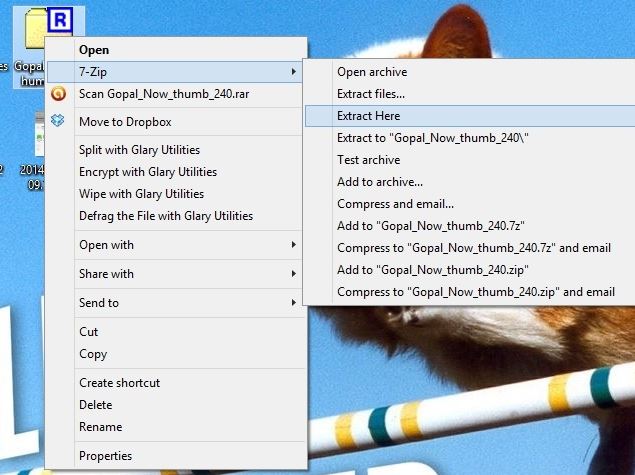
(Image Courtesy: NDTV)
How To Open RAR Files On Mac?
The most popular extractor for Mac is RAR Extractor Free. To use it, use the following steps:
#1. Right click on an RAR file and select open with.
#2. Select RAR Extractor Free. This will automatically extract all files of that compressed folder.
So, there you have it. RAR files can be used for efficient transfer of large files and also for storing large files on your computer. Plus, it is extremely easy to open and use them. If you found this article informative, let us know in the comments below.
(Featured Image Courtesy: BitZipper)

 Share
Share


