
To use 4G network services, having a 4g compatible phone is necessary. You should check whether your phone is 4G enabled at the time of purchase itself.
Otherwise, you will be disappointed if you have bought an expensive phone that does not support the latest technologies.
So you can try any of the following typical methods to check whether your phone is 4G compatible.
1. Look for the specifications section in the user manual booklet and see the type of networks that your mobile supports. If 4G or Long Term Evolution (LTE) is mentioned, your phone is 4G enabled.
2. You can also refer the website of your mobile phone manufacturer if you do not have the user manual. The PDF copy of the user manual can be available online.
3. Check whether your area is covered with a 4G network, by examining whether your phone shows the signal for 4G network at its status bar.
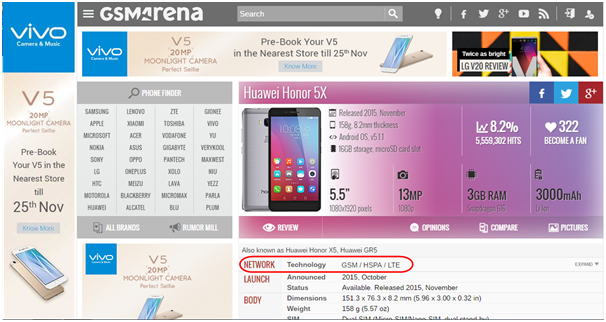
4. You can also go to the GSM Arena website and search for your mobile phone. You will get the specifications of your phone. In the Network section, check whether your phone supports 4G or LTE.
Note: If your phone has 4G support, it will be stated in the package box.

18 Opinions

10 Opinions


